 Cindergrid
Render the shot tonight. Pick up the frames in the morning.
Cindergrid is a cloud render farm for 3D and VFX studios. Upload the scene and its caches, choose CPU or GPU nodes, and sync finished frames back to your workstation. Up to 250 TB of downloads a month on Pipeline.
No card needed for the trial. Spark is pay as you go after that.
Your queueeu-north
- 41.8 million
- core-hours rendered in October 2026
- 9.7 PB
- of frames and caches moved in 2026 so far
- 1,380
- studios, from two-person shops to feature houses
- 7 regions
- with 99.9% or better scheduler uptime over 90 days
From scene file to finished frames
The farm is the same on every plan. What changes is how much runs at once and how much you can move.
Upload only what changed
The sync client hashes every file, skips what the farm already holds and sends the rest in 8 MiB chunks over up to 32 parallel streams. Interrupted uploads resume where they stopped.
Pick nodes and a deadline
Choose a node class and tell the scheduler when you need the shot. It works out how many nodes that takes and shows the cost before you confirm.
Watch buckets turn into frames
Frames, tiles and passes stream into the job page as they finish, so you can approve a look on frame 12 while frame 1,800 is still running.
Sync the results home
Finished frames, EXR passes and logs download to a folder you choose, checked against the farm's hashes. Nothing is half-written to your disk.
Six node classes, billed by the second
Per-core-hour on CPU, per-GPU-hour on GPU. One minute minimum per node, then billed to the second.
Specs and benchmarksKiln C64
64 cores, 256 GB RAM, 2 TB NVMe scratch. The default for Arnold, V-Ray and Karma CPU frames.
$0.0055 / core-hrKiln C128
128 cores, 512 GB RAM, 4 TB NVMe. Fewer, larger nodes for heavy fluid and volume work.
$0.0049 / core-hrKiln M96
96 cores with 1.5 TB RAM for scenes that never fit anywhere else.
$0.0068 / core-hrArc G1
One 24 GB GPU. Cycles, Redshift and Unreal Movie Render Queue shots up to mid-size.
$0.62 / GPU-hrArc G2
One 48 GB GPU with 128 GB system RAM. Heavy textures and out-of-core geometry.
$1.10 / GPU-hrArc G4
Four 80 GB GPUs per node, NVLink-connected. Karma XPU and large simulations.
$2.35 / GPU-hr
Passes come back as passes
Beauty, diffuse, specular, depth, normals, cryptomatte and every custom AOV your renderer writes. Multi-layer EXRs arrive as written, with metadata intact, so the comp artist opens them exactly as if the shot had rendered down the hall.
Per-frame logs, memory high-water marks and render time per pass are stored with each job for 90 days.
What the platform does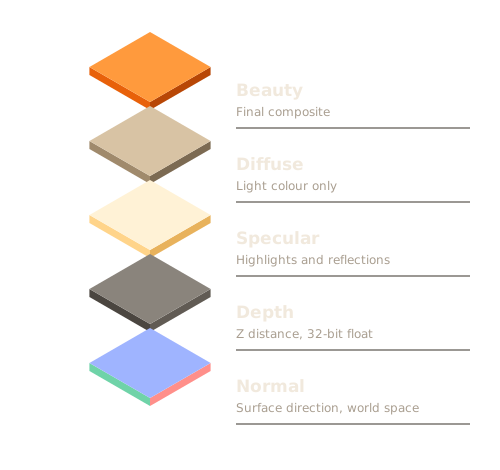
Built into the tools you already use
Submit from the application, or from the command line in your own pipeline.
- Blender 4.2 LTS to 4.5
- Maya 2025.3, 2026.1
- Houdini 20.5, 21.0
- Cinema 4D 2025.3, 2026.0
- 3ds Max 2025, 2026
- Nuke 15.2, 16.0
- Unreal Engine 5.5, 5.6
Renderers include Cycles, Arnold, V-Ray, Redshift, Karma, Corona and the Unreal Movie Render Queue. Bring your own licences through a secure tunnel or use metered ones billed per node-hour. Full compatibility list
We moved a 1.4 TB hair-and-cloth shot to Cindergrid on a Thursday. By Monday the supervisor had every pass in review, and nobody had touched the workstations over the weekend.
Questions we hear on the first call
More in the documentation, or ask a person.
How big can a scene be?
Single projects up to 12 TB on Studio and 60 TB on Pipeline, including caches, textures and referenced assets. The sync client de-duplicates by content, so the second version of a 900 GB scene usually uploads only the files that changed.
Do you keep my files?
Scene data is deleted 30 days after the last job that used it unless you archive it. Rendered frames stay available for download for 14 days after the job finishes. You can shorten both per project.
Can I cap what a job costs?
Yes. Every job takes an optional cost cap in dollars. When the running estimate reaches the cap, the scheduler stops starting new frames, finishes the ones in flight and tells you what is left.
What if a node dies mid-frame?
That frame is requeued on another node at no charge. You are billed only for frames that complete, plus the time of frames you cancel yourself.